Demo build log — .NET (UnclaimedProperty.com)
What this is. A write-up of the ASP.NET Core / Razor build of the UnclaimedProperty.com waitlist page, consuming the framework-agnostic web components (
@kofile/gds-wc) as drop-in HTML. This is the reference implementation — its markup and token-alignedsite.csswere the blueprint the React and Vue demos were built from. The app lives atexamples/dotnet-unclaimed-property.▶ View the live demo — a static snapshot of the rendered page (see Hosting).
The setup
| Target design | Figma UnclaimedProperty.com → unclaimedproperty-homepage (node-id=4-5610) |
| Stack | ASP.NET Core (Razor Pages) + a mock in-memory REST API + CSRF |
| Design system | @kofile/gds-wc web components + @kofile/gds-foundations tokens |
| Icons / font | Phosphor + Source Sans 3 |
| Delivery modes | CDN (zero-build) and self-hosted (wwwroot/lib, offline / strict-CSP) |
| Parity | a Figma↔Playwright compare harness (compare/*.mjs, .design-compare/) |
| Sibling demos | React (@kofile/gds-react) and Vue (@kofile/gds-wc) |
Because .NET consumes the same <neumo-*> web components as the Vue demo, this
build is the canonical "web components in a server-rendered app" path.
Source files (browse on GitHub) —
Pages/Index.cshtml (markup) ·
Pages/Shared/_Layout.cshtml (CDN/self-hosted switch) ·
wwwroot/css/site.css (token-aligned styles) ·
wwwroot/js/site.js (wiring the components to the API) ·
vendor-assets.sh (self-hosting) ·
compare/ (parity harness) ·
README.md (run + teaching guide)
Step 1 — Consuming the web components in Razor
The components are just custom elements, so the .cshtml markup is plain HTML —
no framework binding layer. The key patterns:
<neumo-label for="email">Email Address</neumo-label>
<neumo-input id="email" type="email" data-size="xl" data-alt-background></neumo-input>

<neumo-select id="state" data-size="xl" placeholder="Select state...">
  <neumo-option value="CA">California</neumo-option>
</neumo-select>

<neumo-button id="submit" data-variant="primary" data-size="xl">
  <i slot="icon-start" class="ph ph-magnifying-glass"></i>
  Notify me at launch
</neumo-button>
wwwroot/js/site.js wires them to the mock API, and documents the three things a
web-component consumer needs to know (identical to the Vue findings):
- A web component is a DOM element — read its value with
element.value. <neumo-select>reads its menu from anoptionsproperty, not the<neumo-option>children —site.jsmaps the declarative markup intoselect.optionsonce the element upgrades.<neumo-button>doesn't submit a form — it emitsneumo-button-click;site.jslistens for that and POSTs to/api/waitlistwith the CSRF token.
It also carries a documented accessibility shim:
<neumo-label for>can't focus an input inside shadow DOM, sosite.jsforwards label clicks to the real focusable element and addsaria-labels — the same gap the a11y-audit and Vue demos flagged.
Step 2 — Two delivery modes (and a post-privatization finding)
_Layout.cshtml loads the design system one of two ways, flipped by
DesignSystem:Source:
cdn—<script>/<link>to public CDNs (zero build; nice for a quick demo).local— the self-hosted copies inwwwroot/lib(vendored byvendor-assets.sh:esbuild-bundlesgds-wcwith Lit inlined, copies the branded token CSS + Phosphor). For offline / strict-CSP / production.
Finding — CDN mode broke when the packages went private. The
cdnpath pulls@kofile/gds-wc/@kofile/gds-foundationsfrom esm.sh / jsDelivr, which can't serve private npm packages — so post-privatization the self-hosted (local) mode is the working path. This is worth calling out in the demo: for private design systems, vendor the assets (vendor-assets.sh) rather than relying on public CDNs. (The public Font/Phosphor CDNs still work.)
Self-hosting the design system — step by step
This is the real path for a private design system (and it's exactly what the
hosted live demo above is built from). It vendors the design system
into wwwroot/lib so the app serves everything itself — no external requests,
CSP-friendly, offline-capable.
- Authenticate to npm. The
@kofile/*packages are private, so the vendor step needs a one-time token:npm config set //registry.npmjs.org/:_authToken=PASTE_TOKEN_HERE(full walkthrough: the npm access token guide). - Vendor the assets — run
./vendor-assets.sh. It:esbuild-bundles@kofile/gds-wcwith Lit inlined →wwwroot/lib/gds-wc.js(one self-contained ESM file, no bare imports),npm packs@kofile/gds-foundationsand copies the branded theme →wwwroot/lib/gds-foundations.branded.css,npm packs@phosphor-icons/weband copies the regular weight + fonts →wwwroot/lib/phosphor/. Versions are pinned at the top of the script (treat them like NuGet versions).
- Switch to local mode — set
DesignSystem:Source=localinappsettings.json, orDesignSystem__Source=localas an env var._Layout.cshtmlthen emits<link>/<script>tags at thewwwroot/libpaths instead of the CDNs. The page markup doesn't change — only the asset origin does. - Commit
wwwroot/lib— check the vendored files into source control so builds are reproducible and need no npm/network at deploy time. - Run —
dotnet run. Confirm in devtools that the design-system assets load from your own origin and there are no external requests.
The GitHub-Pages live demo above is this local-mode output captured as static files — so the snapshot doubles as proof the self-hosted bundle runs standalone.
Step 3 — Token alignment
wwwroot/css/site.css is fully token-driven — its own header says "every value
mapped 1:1 from the Figma design to its design-system token; no raw hex, no magic
pixels except the two one-offs the design hard-codes (card radius 16px, card
padding 40px)." It's the stylesheet the React and Vue demos ported, so the same
neumo-MCP passes apply: audit-tokens (color), audit-spacing, and typography
verified against the token ramp. The one design-vs-component delta is the
<neumo-input data-alt-background> gray fill, which doesn't render (the component
doesn't propagate the mode) — the same gap noted in the Vue build.
Step 4 — Figma↔Playwright parity harness
Unlike React/Vue, this demo ships a parity harness (compare/screenshot.mjs,
compare/verify.mjs, compare/compose-casestudy.mjs, output in
.design-compare/): it screenshots the running app with Playwright and diffs it
against the Figma target (figma-target-full.png vs rendered-full.png), and
verify.mjs even caught the label-focus shadow-DOM issue that drove the a11y
shim. Reusable idea worth lifting into the other demos.
Hosting a static snapshot
The docs site is static (GitHub Pages), so the real ASP.NET server (with its
/api/waitlist backend + CSRF) can't run there. To still give a clickable live
link next to React/Vue, the demo hosts a static snapshot:
- Run the app once in self-hosted (
local) mode so every asset is same-origin (wwwroot/lib). - Capture the pristine server-rendered HTML; rewrite its absolute asset paths to
relative (subpath-safe under
/demos/dotnet/app/); add the Source Sans webfont. - Mock the API with a tiny
fetchshim so the realsite.jscode path (validation → loading → success) runs against a stubbed201— the form works without a backend, exactly like the React/Vue static demos. - Commit the snapshot (
examples/dotnet-unclaimed-property/static-snapshot/) and copy it into the site at build time.
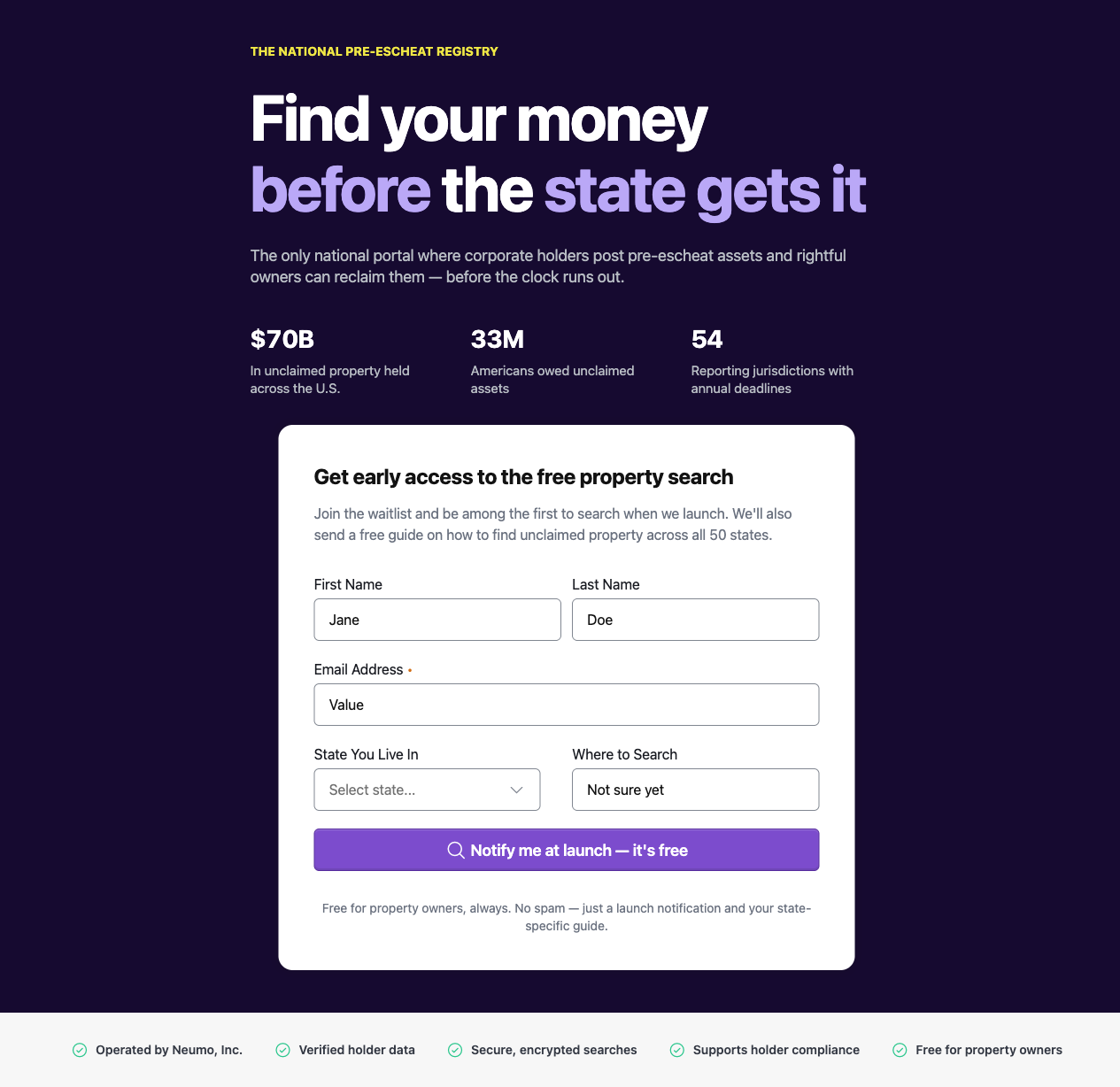
It's a frozen render, not the live server — the write-up above is the server story; the snapshot is the visual + client-side interactivity. For the real thing, run the container/app locally (README).
Where the MCP server + Figma toolkit show up
- Figma toolkit — read the frame as the visual target (shared across all three demos); the parity harness screenshots the running app and diffs it against the Figma export.
- neumo MCP server — the
site.csstoken alignment (audit-tokens/audit-spacing/ typography), inherited by React and Vue as the blueprint.